
Amazon Seller Account Fees Explained and How to Save
You make your first sale on Amazon, check the payout, and feel that small jolt of confusion. The item sold. The customer paid. But the amount heading to you is lower than the simple math you had in your head.
That surprise is why Amazon seller account fees trip up so many sellers. Many sellers focus on the visible subscription choice first, then discover that Amazon charges in layers. One fee is tied to your selling plan. Another is tied to the category you sell in. If you use Fulfillment by Amazon, storage and fulfillment create another layer. Refunds, returns, advertising, and delayed disbursements can add pressure in ways that don’t show up in a basic profit estimate.
A good way to think about it is this. Your Amazon account isn’t just rent for shelf space. It’s closer to paying a storefront fee, a sales commission, and a warehouse bill at the same time. If you don’t model those layers before listing a product, the platform can still drive revenue while reducing contribution margin.
This article is for informational purposes and not to be construed as legal advice. No attorney client relationship exists based on the review of this this article and none of the information in this article is legal advice.
Introduction to Amazon Seller Account Fees Without Surprises
A new seller usually starts with one simple question. “How much does Amazon charge me to sell?” That sounds like a subscription question, but it usually isn’t. The answer depends on when Amazon charges, what category your product sits in, and how your fulfillment setup works.
Why the first payout feels smaller than expected
Say you list a product, make a sale, and expect to keep the selling price minus product cost. That’s the beginner mistake. Amazon seller account fees don’t arrive as one clean deduction. They come as a stack.
Here’s the stack in plain language:
- Account access cost: You either pay a monthly subscription or a per-item selling fee.
- Referral fee: Amazon takes a category-based cut from the sale.
- Fulfillment and storage costs: These apply if Amazon stores and ships your inventory.
- Tail costs: Returns, refund-related deductions, advertising, and reserve or hold issues can all affect what lands in your bank account.
Practical rule: If you only track sales revenue and product cost, you’re not tracking profit. You’re tracking hope.
Most fee guides stop at the top line. They tell you that a Professional account has a monthly cost and an Individual account has a per-sale cost. That’s useful, but incomplete. In real operations, the subscription often ends up being the smallest line item in the whole picture.
The better way to look at fees
When I help sellers think through costs, I prefer contribution margin math. Start with the customer payment. Subtract the fees directly attached to getting and fulfilling that order. Only then ask whether the SKU deserves more inventory, more ad spend, or a better listing.
Readers also get tripped up by timing. Some fees hit every order. Others build gradually through inventory age, storage usage, or a disbursement issue that slows cash flow just when restocking money is needed.
A product can sell well and still be a bad Amazon product if the fee stack is wrong.
The rest of this guide treats fees the way operators experience them. We’ll make the subscription choice clear, turn referral fees into simple math, make FBA storage more tangible, and then deal with the hidden costs and billing pitfalls that most sellers notice too late.
Choosing Between Individual and Professional Selling Plans
A new seller often fixates on the $39.99 monthly subscription because it is visible and easy to understand. In real Amazon math, that line item is usually the top layer of the fee stack, not the heaviest one.
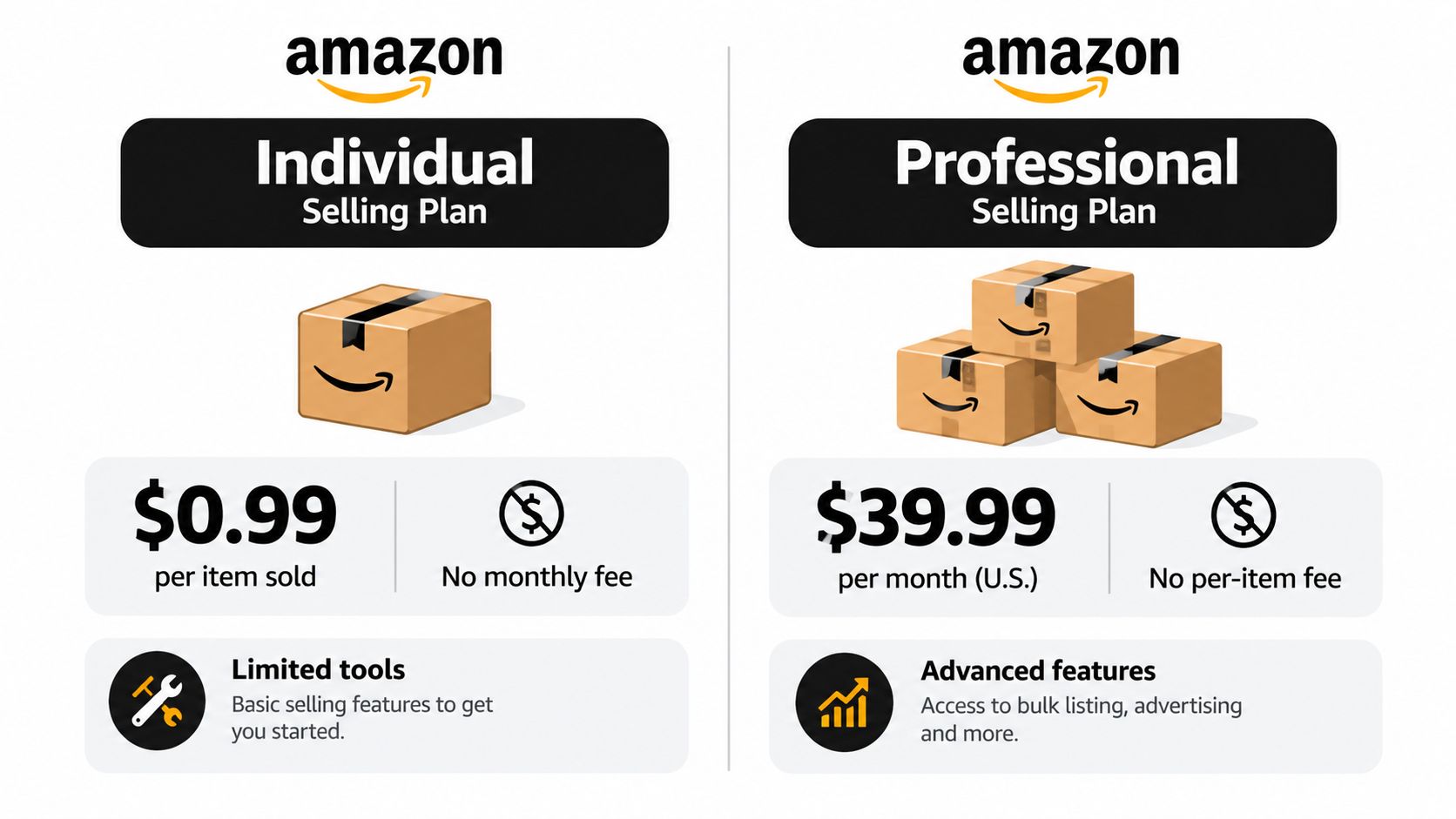
Amazon offers two core U.S. selling plans. The Professional plan costs $39.99 per month, while the Individual plan has no monthly subscription fee and charges $0.99 per item sold, according to Amazon’s Seller Central fee documentation.
Start with the break-even math
This choice works like rent versus pay-per-use.
With the Individual plan, each sale carries a small toll. With the Professional plan, you pay a fixed monthly amount whether you sell one unit or one hundred. The rough break-even point is easy to calculate: once your monthly sales volume gets to about 40 items, the Individual plan’s per-item charges add up to roughly the same amount as the Professional subscription.
That does not mean 40 units is an automatic switch point. A seller who moves 40 units one month and 8 the next may still prefer the variable-cost plan. A seller who expects steady volume, wants cleaner forecasting, or needs seller tools may choose Professional earlier because the account supports the way the business runs.
When the Individual plan fits
The Individual plan usually makes sense for sellers who are still proving demand.
Common examples include:
- Testing a product idea: You keep account costs tied to actual sales.
- Selling leftover or limited inventory: There is no recurring subscription during quiet months.
- Running a very small catalog: Manual listing and slower workflows may still be manageable.
This plan is often less about maximizing efficiency and more about buying information cheaply. You are paying a little more per order in exchange for flexibility while you learn.
When the Professional plan starts making sense
The Professional plan tends to fit sellers who are building a repeatable operation rather than running a simple experiment. Amazon’s plan comparison shows that Professional sellers get access to broader selling features and tools that are not part of the Individual setup, including capabilities tied to scaling a catalog and operating with more structure, as explained in Amazon’s selling plan comparison.
That matters because plan choice affects workflow as much as fees.
- Larger catalogs: More SKUs usually require faster listing and editing tools.
- System-based operations: Software, reporting, and process automation often work better with a Professional account.
- Growth plans: Sellers preparing to advertise, expand selection, or standardize operations often outgrow the Individual plan before the pure fee math forces the change.
One point causes confusion. Sellers sometimes spend too much time comparing $0.99 per item against $39.99 per month and too little time on the full fee stack. In many cases, the difference between these plans ends up smaller than the referral fees and fulfillment costs attached to each order.
That is why the better question is not just, “Which plan is cheaper?” It is, “At my sales volume and operating style, which plan gives me the lower total cost and fewer operational bottlenecks?” For many sellers, especially after recent marketplace changes pushed margins tighter in 2025 and 2026, that answer comes from steady volume and process needs, not from the subscription price alone.
How Referral Fees Really Work and Why They Dominate Your Margin
A seller can spend days comparing $0.99 per item to $39.99 per month, then lose far more money on one bad category assignment.
That happens because the subscription sits at the top of the bill, but referral fees sit inside every order. They are part of the fee stack that keeps repeating. Amazon explains that referral fees apply to each sale and are calculated on the item price plus delivery and gift-wrap charges, or the applicable minimum referral fee, whichever is greater, according to Amazon’s referral fee documentation.
What Amazon is actually charging on
Referral fees work like a percentage applied to the customer-facing sale amount, not just the product sticker.
That distinction causes a lot of confusion. A seller may price an item at $20 and assume the referral fee applies only to that $20. If the customer also pays shipping or gift wrap, Amazon can use those charges in the referral-fee calculation too. A pricing decision that looks minor on the storefront can change the fee math underneath it.
The practical lesson is simple. Review the full amount tied to the order, not just the item price.
How category differences drive your referral fee
Category is often where margin changes fastest.
Many sellers know that referral fees vary by category, but they treat that as a background detail. It is closer to a tax bracket for the SKU. A small category difference can change every future order for that listing, which is why referral fees often matter more than the monthly plan price.
Here is the math in plain terms:
| Category Example | Fee Rate | $15 Item Fee | $30 Item Fee |
|---|---|---|---|
| Many common categories | around 15% | about $2.25 | about $4.50 |
| Higher-fee categories | much higher than common categories | much higher than $2.25 | much higher than $4.50 |
That table explains why the subscription is usually the smallest line item in the stack. On a $30 item in a typical 15% category, the referral fee is about $4.50 before fulfillment, storage, ads, returns, and packaging enter the picture. After only a handful of orders, repeated per-order fees can pass the monthly subscription total.
Break-even math sellers should run first
A fast break-even check keeps this tangible.
Start with expected selling price. Multiply by the category referral rate. Then compare that result to your planned gross margin per unit. If the product has only a thin margin before Amazon fees, the referral fee may consume a large share of what looked like profit on paper.
For example, if a product sells for $30 and lands in a 15% category, about $4.50 goes to referral fees. If your pre-Amazon gross profit was $9 per unit, half of that margin is already gone before fulfillment costs are counted. This is why experienced operators review fee exposure at the SKU level, not just at the account level.
The 2025 and 2026 fee conversation made this more important, not less. With tighter margins across the marketplace and no new 2026 FBA fee types announced, sellers still need to watch the repeating fee layers that were already there. Referral fees remain one of the largest and easiest-to-miss parts of that stack.
A better SKU review habit
Use a four-part check before you commit to a product or revise a listing:
- Confirm the assigned category. Do not assume Amazon placed the SKU where you expected.
- Check the referral rate for that category. A small rate change can reshape margin.
- Review how shipping is presented to the buyer. Customer charges can affect the fee base.
- Test low-priced items against minimum fees. On cheap products, the minimum can matter more than the percentage.
If you want a second plain-English comparison of how these fee layers add up, this 2026 Amazon fee guide is a useful reference.
The core idea is straightforward. Sellers rarely get into trouble because of the subscription alone. They get into trouble when a repeated percentage fee looks small in isolation, then takes a bite out of every order.
Understanding FBA Fulfillment Storage and Long Term Storage Costs
A seller sees the $39.99 monthly plan and assumes that is the fee to watch. Then the first FBA bill arrives, and the stack shows up. One unit can carry a referral fee, a fulfillment fee, a storage charge, and later an aged-inventory charge if it sits too long. The subscription was the smallest layer all along.
Amazon has said there are no new FBA fee types in 2026, so the challenge is not learning a brand-new system. It is getting better at measuring the physical cost layers that were already there, as noted in Amazon’s 2026 U.S. fee update.
Fulfillment is the per-unit handling layer
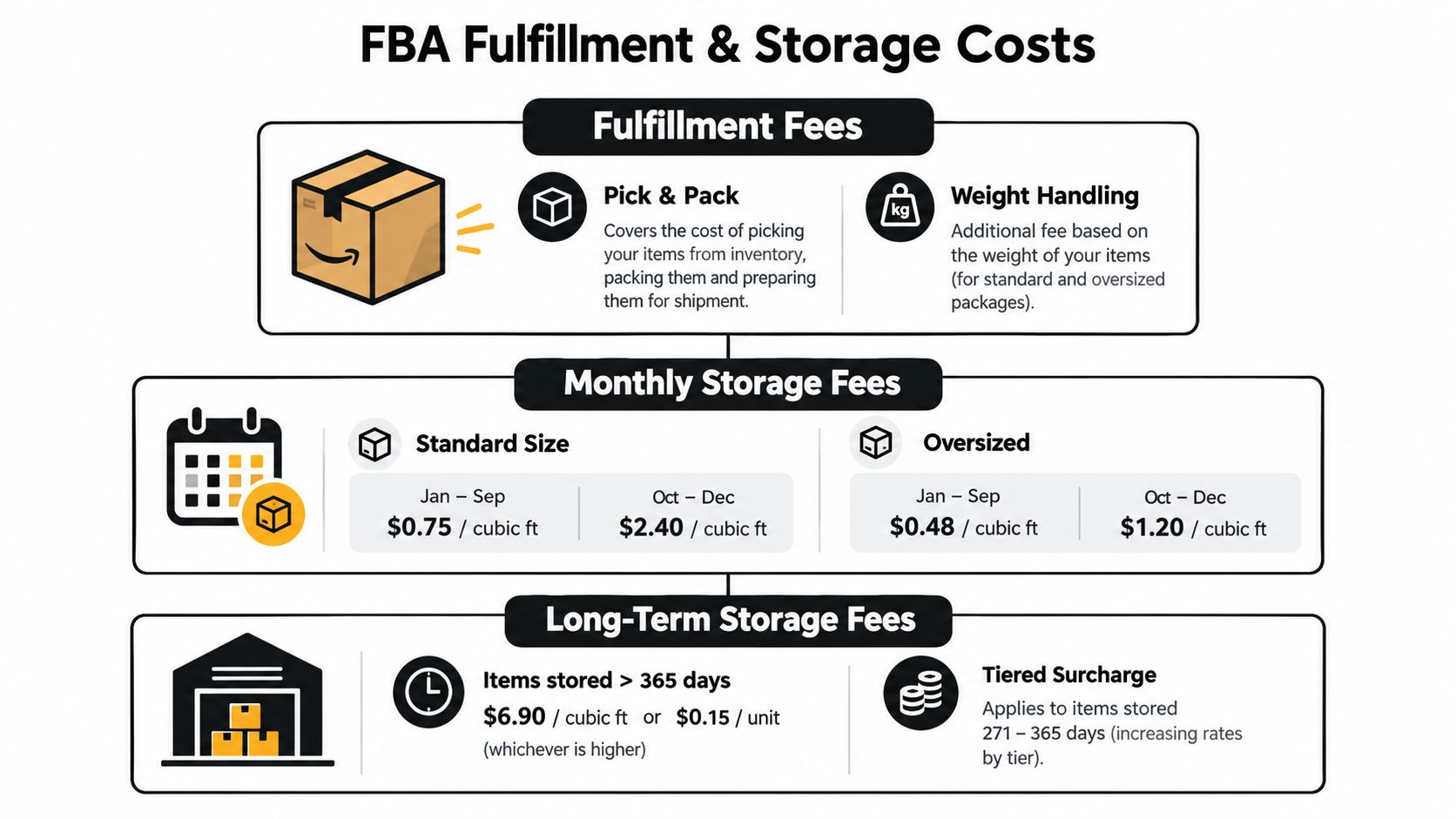
FBA fulfillment fees are Amazon’s charge for warehouse labor and parcel preparation. Your item is received, stored, picked, packed, and shipped. Amazon prices that work based largely on size and weight tiers.
This is why packaging decisions matter more than many new sellers expect.
A box that is slightly larger than it needs to be can change the fee profile for every unit sold. That is not a one-time mistake. It repeats on every order, which makes fulfillment one of the easiest costs to underestimate during product selection.
Storage is rent for space, charged over time
Storage works like paying rent for shelf space in a busy warehouse. Amazon looks at the daily average volume your inventory occupies, measured in cubic feet. Sellers often focus only on unit count, but two products with the same quantity can create very different storage bills if one takes up much more space.
That gives you two control points:
- Space per unit. Smaller packaging reduces the cubic feet attached to each item.
- Days in storage. Faster sell-through reduces how long you keep paying for that space.
A small item with slow turnover can still become expensive. A large item with slow turnover gets there faster.
The break-even math sellers should run
Here is the practical question: how many extra dollars in margin do you need before FBA still makes sense after physical handling and storage are added?
Use a simple SKU check:
Break-even contribution per unit = product cost + referral fee + FBA fulfillment fee + expected storage cost per unit
If your selling price does not leave enough room above that number, the SKU is weak even if sales volume looks promising.
For example, suppose a product sells for $30. The referral fee already reduced margin in the previous step of your analysis. Now add FBA fulfillment and a reasonable storage allocation per unit. If those physical costs absorb another meaningful slice of your gross profit, your comfortable-looking SKU can turn tight very quickly. That is the layered-stack view many fee guides miss. The subscription fee is fixed and visible. FBA costs repeat unit by unit.
A practical example of how storage sneaks up
Say you send 500 units of a bulky product because the supplier offered a better price at a larger order size. Sales slow after the initial launch period. Nothing dramatic happens in one day. The inventory just keeps occupying space, and the storage meter keeps running.
Then the same unit still carries its normal fulfillment fee when it finally sells.
That means one SKU can pressure margin in three directions at once:
- a percentage fee tied to the sale
- a per-unit warehouse handling fee
- a storage cost tied to size and time
That combination explains why experienced operators often work on carton dimensions and replenishment timing before they worry about shaving small fixed account costs.
A short explainer can help if you want a visual walkthrough of the warehouse side of the fee stack.
What changed recently, and why it matters
Many fee articles treat Amazon’s cost structure as static. It is not. Amazon’s 2025 U.S. update kept the broader referral and FBA structure mostly in place while introducing lower inbound placement fees for some bulky items and temporary incentives tied to some new selection programs, according to Amazon’s 2025 selling partner update.
That matters if you sell awkward, heavy, or space-hungry inventory. A change in inbound placement cost can alter reorder timing, shipment planning, and how aggressively you send inventory into FBA.
It also helps to separate true fees from recoverable losses. If inventory goes missing or is mishandled, review your fee analysis alongside your process for Amazon FBA reimbursement claims and recovery review. Otherwise, a reimbursement issue can get mistaken for ordinary margin erosion.
Where long-stay inventory becomes a real problem
Long-term storage costs usually come from forecasting errors repeated over time. The SKU was ordered too heavily, replenished too early, packaged too large, or left untouched when sales slowed.
Use a simple operating rule. The longer inventory sits, the more your business model starts to resemble warehouse rent instead of retail turnover.
A disciplined response usually looks like this:
- Send smaller quantities on uncertain SKUs
- Reduce packaging size where product safety allows
- Review aged inventory before high-storage periods
- Discount, remove, or bundle slow-moving stock before fees build further
Hidden Costs That Catch Sellers Off Guard
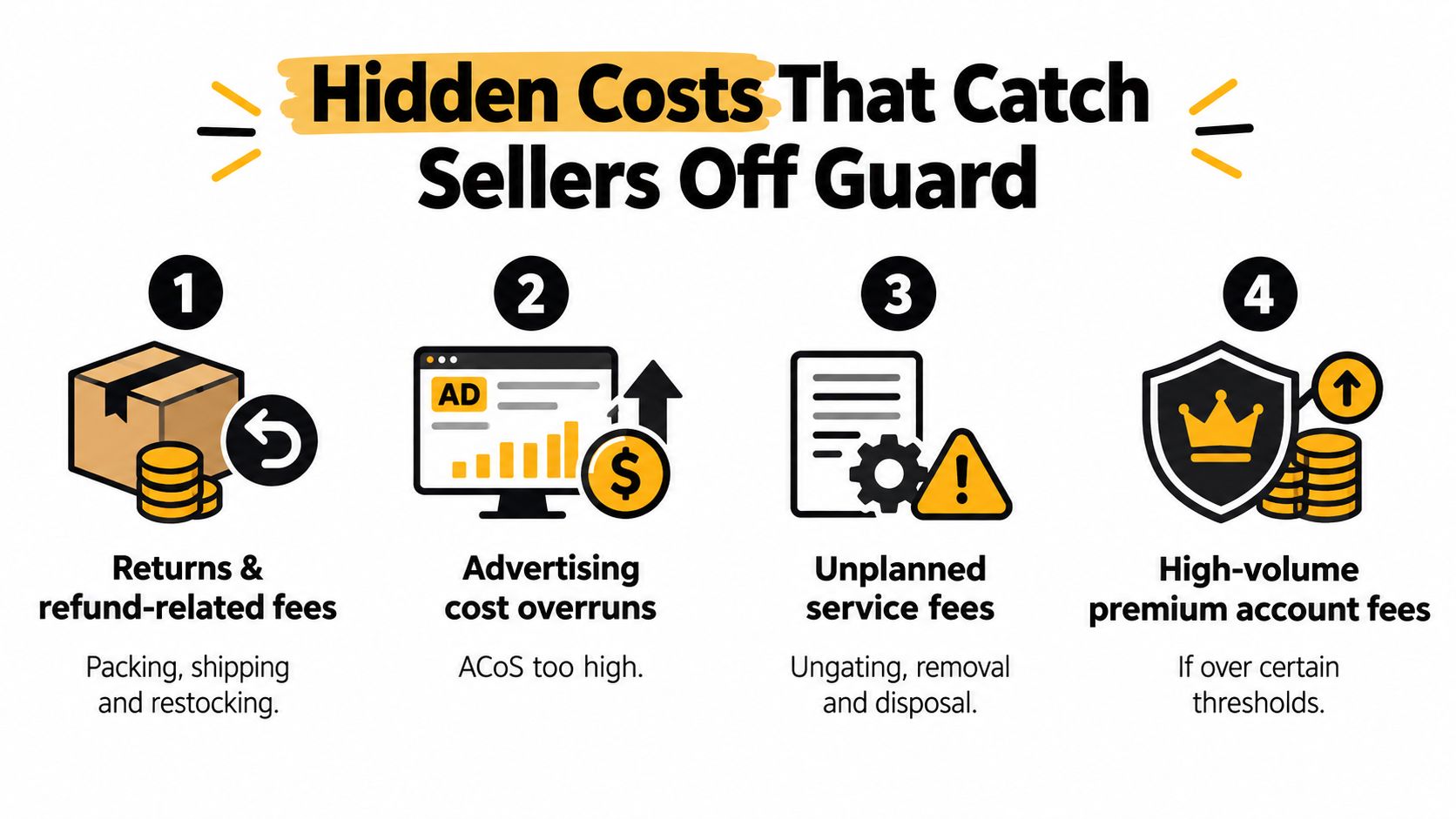
Most sellers eventually learn the visible fees. The hidden costs are what usually wreck confidence. A product that looked healthy on a basic spreadsheet starts underperforming once returns, ad spend, and payout friction enter the picture.
Returns don’t rewind the whole transaction
A refund can adjust part of the economics without restoring all of them. Sellers often assume a returned order puts them back where they started. It usually doesn’t.
The sale may reverse, but the labor, shipping movement, ad spend, or related operational cost tied to that order may still linger in your margin picture. That’s why contribution margin beats gross margin as a management habit. Gross margin ignores too much of what happened.
Advertising sits outside Amazon account fees, but not outside reality
Sponsored Products spend isn’t the same thing as Amazon seller account fees, yet it competes for the same dollars. If a SKU already has tight referral and fulfillment economics, heavy ad spend can push it into weak contribution territory even while sales volume looks encouraging.
Bookkeeping discipline matters. If your accounting view doesn’t separate product cost, Amazon fees, tax handling, and ad spend clearly, you’ll misread which products deserve more inventory. A practical primer on how ecommerce operators manage COGS and sales tax can help tighten that view.
The monthly audit that prevents surprises
Run a brief monthly review with these checks:
- Returned-order review: Look for SKUs with frequent returns and ask whether the issue is listing clarity, product quality, or fulfillment condition.
- Advertising sanity check: Compare ad spend against the leftover contribution after direct selling costs.
- Service-fee scan: Watch for removals, disposals, or account-level deductions you forgot to budget for.
- Payout timing review: Confirm whether reserves or delayed disbursements are altering your purchasing plan.
The subscription fee is often the smallest line on the statement. The hidden tail is where many sellers actually lose control.
Reserve balances create another layer of confusion because they affect cash flow rather than per-order profitability. If money isn’t disbursing the way you expect, review how Amazon disbursement holds and reserves can interrupt purchasing, payroll, or restocking even when sales continue.
Proven Strategies to Reduce Fees and Avoid Billing Pitfalls
The best fee reductions usually come from operational changes, not clever accounting. You don’t need magic. You need tighter packaging, cleaner inventory turns, and fewer category mistakes.

Start with the levers you can control
Some fee drivers are fixed by category rules. Others are very adjustable.
Focus on these first:
- Packaging size: Smaller packaging can improve fulfillment and storage efficiency.
- Inventory turnover: Faster sell-through reduces how long Amazon stores your units.
- Shipment planning: Smarter inbound decisions can lower placement-related friction, especially where recent policy changes matter.
- Category accuracy: If a SKU sits in the wrong category, you may be absorbing the wrong referral rate structure.
A lot of sellers chase minor plan savings while ignoring packaging. That’s backward. A recurring dimensional problem can cost more over time than the monthly subscription decision ever will.
Watch the billing side, not just the fee side
A store can be profitable on paper and still feel stressed if disbursements are delayed, funds are reserved, or the account enters a review period. The fee schedule tells you what Amazon charges. It doesn’t solve timing problems when cash gets trapped inside the platform for a period that matters to your business.
That issue became more important as marketplace-specific policy updates started affecting sellers differently. Amazon’s recent updates show that fee relief and incentives can vary by marketplace and fulfillment circumstances. A seller with bulky inventory, slow-moving stock, or a constrained cash cycle may experience those changes very differently from a lighter, faster-moving operation.
A practical order of operations
If you want one short playbook, use this:
- Measure your top sellers’ packaging Find products with unnecessary dimensional waste.
- Review aged inventory every month Don’t let slow stock become a storage problem by neglect.
- Audit SKU category placement Make sure the listing classification matches the expected economics.
- Forecast cash, not just profit A healthy margin doesn’t help if funds are withheld during a critical reorder window.
- Escalate account-status issues quickly If withheld funds or account restrictions are affecting operations, sellers sometimes consult specialists, including counsel familiar with reinstatement and platform disputes such as LA Law Group, APLC, depending on the nature of the issue.
The mistake I see most often is sequencing. Sellers often optimize ad campaigns before they optimize fee structure. That’s like tuning the engine before checking whether the car is dragging a trailer.
Next Steps for Managing Fees and Getting Legal Help When Needed
The cleanest way to manage Amazon seller account fees is to stop treating them as one number. They are a layered operating system. One layer starts with plan choice. Another sits inside category-based referral charges. Another comes from fulfillment and storage. Then the hidden tail shows up through returns, advertising, and payout timing.
Use a per-unit contribution habit
Before you scale a SKU, calculate its true per-unit contribution. Start with what the customer pays. Subtract the direct selling costs attached to that order. Then ask whether the product still deserves inventory, ad spend, and reorder cash.
That habit protects you from the most common Amazon mistake, which is confusing sales activity with healthy economics.
Know when the problem stops being operational
Some issues aren’t just spreadsheet problems. If Amazon is withholding funds, freezing disbursements, or restricting the account in a way that strands inventory or blocks normal operations, the next step may require a legal review rather than another pricing adjustment. Sellers dealing with those situations can look into an Amazon seller lawyer when account status, withheld funds, or suspension issues begin affecting business continuity.
This article is for informational purposes and not to be construed as legal advice. No attorney client relationship exists based on the review of this this article and none of the information in this article is legal advice.
If your account is under pressure, don’t wait for the fee stack to turn into a cash-flow crisis. Get the numbers organized, document what changed, and seek help when the issue moves beyond ordinary operations.
LA Law Group, APLC works with Amazon sellers on matters such as account reinstatement, withheld funds, and related platform disputes that can directly affect fee recovery and cash flow. If you’re dealing with a suspension or a reserve problem that goes beyond normal seller support channels, visit LA Law Group, APLC to review your situation and request a free initial consultation.
Attorney Advertising. This article is general information, not legal advice, and does not create an attorney-client relationship. Prior results do not guarantee a similar outcome.