
Closing an Amazon Seller Account A Seller's Legal Guide

This article is for informational purposes and not to be construed as legal advice. No attorney-client relationship exists based on the review of this article, and none of the information in this article is legal advice.
Closing down your Amazon seller account for good is a serious move. It’s not just clicking a button—it’s a permanent decision that demands careful planning to sidestep some nasty surprises down the road.
Before you even think about starting the official process, you have to get your house in order. That means fulfilling every last order, waiting out the 90-day A-to-z Guarantee claim period, making sure your account balance is at zero, and, crucially, downloading all your business records for safekeeping.
Your Essential Pre-Closure Checklist
Deciding to close your Amazon seller account is a big step, marking the end of a business chapter. It’s a final, irreversible action, and if you treat it like a simple task, you’re setting yourself up for headaches like stranded FBA inventory or funds getting locked up indefinitely.
Think of it like decommissioning a ship. You wouldn’t just abandon it at sea. You’d secure the cargo, settle the books, and make sure the logs are in order before you disembark. Rushing these prep steps is a classic mistake that can haunt you financially and administratively for years.
Fulfilling All Obligations
First things first: you need a completely clean slate with both your customers and Amazon. This means every single pending order must be shipped out and confirmed. Amazon simply won’t let an account with active orders go.
But it doesn’t stop there. You have to wait out a mandatory 90-day period after your very last sale. This window is non-negotiable because it covers the time when customers can file for returns, chargebacks, or A-to-z Guarantee claims. If you try to close your account before this period is up, Amazon will just deny the request.
A classic pitfall for sellers is forgetting about this 90-day cooling-off period. They’ll clear out inventory, zero their balance, and then get frustrated when their closure request is rejected—all because a sale from 80 days ago is still in the claims window. Patience isn’t just a virtue here; it’s a requirement.
Clearing Your Account Health and Finances
Your Account Health dashboard needs to be spotless. Go through and methodically address every performance notification, customer message, and unresolved case log. Any outstanding issue signals a potential liability to Amazon, and they will block the closure.
Once all claims and returns are handled, you can request your final payment. Your balance has to be exactly zero to move forward.
Here’s a quick rundown for the financial and admin cleanup:
- Request Final Payment: Get that last disbursement initiated to transfer any remaining funds to your bank.
- Resolve Performance Notifications: Head to your Account Health page and clear every single warning or violation. Don’t leave anything lingering.
- Cancel Subscriptions: Make sure any Amazon services or third-party tools connected to your account are fully canceled.
If you’re dealing with a suspension or another complex account health problem, a simple checklist might not be enough. Getting those issues resolved is a critical first step. You can learn more about that process in our comprehensive Amazon seller account reinstatement guide.
Preserving Your Business Records
This last prep step is the one most people skip, but it’s absolutely vital for your future. The moment your seller account is closed, you permanently lose access to everything inside Seller Central. There is no getting it back later.
Before hitting that final closure button, you must download and securely store all of your reports. This data is essential for filing taxes, general bookkeeping, and dealing with any potential audits. It’s the only proof you have of your business operations on the platform.
Here are the key reports you need to grab:
- Tax Document Library: Download all your 1099-K forms and any other tax documents.
- Date Range Reports: Pull transaction-level details for your entire selling history.
- Inventory Reports: Get records of all past and present inventory, especially FBA data.
- Business Reports: Save your sales and traffic data by ASIN.
Taking the time to check every one of these boxes ensures a clean, final break from the platform and saves you from a world of trouble later on.
This article is for informational purposes and not to be construed as legal advice. No attorney-client relationship exists based on the review of this article, and none of the information in this article is legal advice.
Navigating The Closure Process in Seller Central
Once you’ve worked through your pre-closure checklist, it’s time for the final step: formally requesting the closure inside Amazon Seller Central. This is where you officially pull the trigger, so it’s critical to know exactly where you’re going and what to expect.
One wrong click here can get you stuck in a frustrating loop with Amazon’s automated system checks.
You won’t find a big, obvious “Close Account” button on your main dashboard. Amazon tucks this option away in the account settings, a place most sellers only visit when they have to make major changes.
Finding The Account Closure Page
To start the permanent closure process, you need to follow a specific path. First, log in to your Seller Central account.
From your dashboard:
- Head to the Settings menu, which you’ll find in the top-right corner.
- Choose Account Info from the dropdown menu that appears.
- On the “Seller Account Information” page, find the “Account Management” section and click the Close Account link.
This takes you to the final request page. Amazon will display a confirmation screen, reminding you that this is a permanent action. The page will also prompt you to confirm that you’ve met all the prerequisites, like shipping all your orders and clearing up any outstanding issues.
This decision tree gives you a good visual of the basic flow for getting your account ready to close.
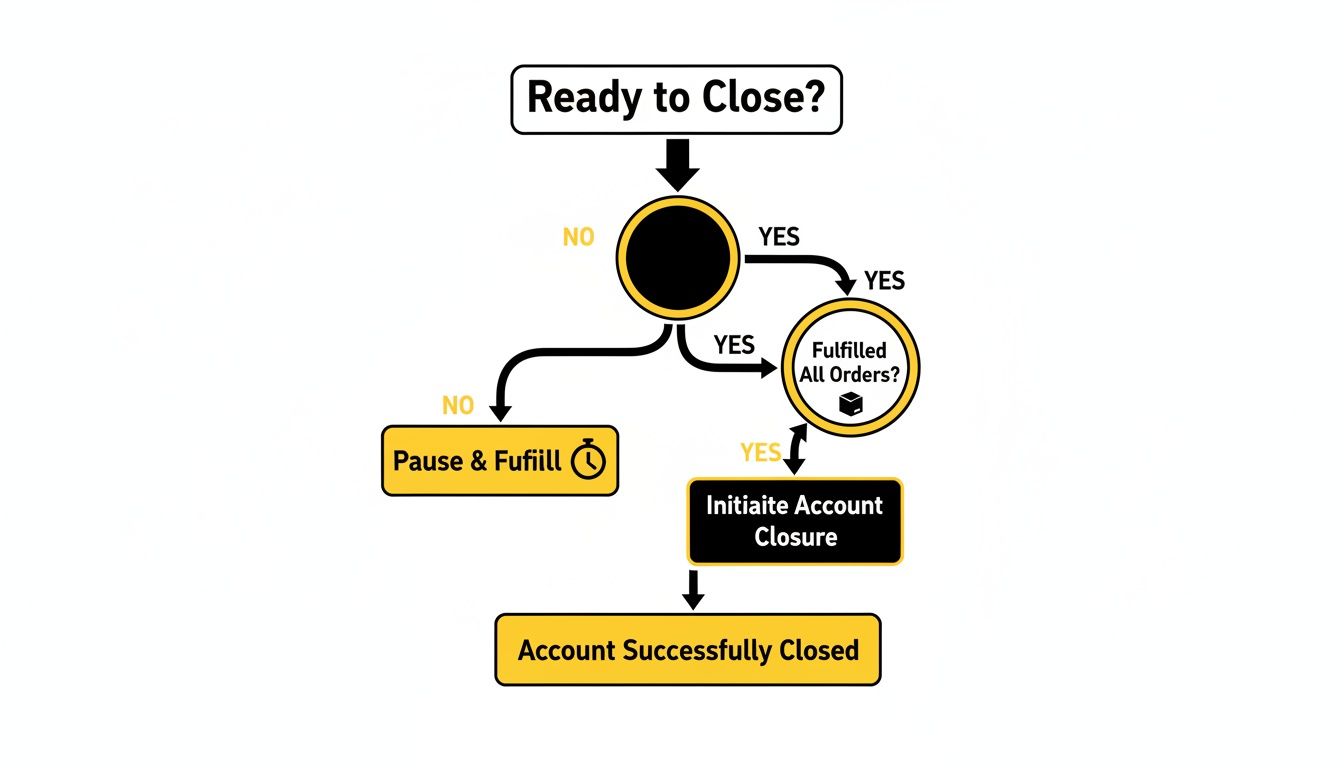
As the chart makes clear, fulfilling every last customer order isn’t just a suggestion—it’s the absolute first thing you must do before even thinking about the technical steps.
Common Roadblocks and Automated Flags
This is where so many sellers get tripped up. After you hit “submit,” Amazon’s system immediately runs an automated check. If that bot finds any unresolved issue, no matter how minor, it will reject your request. You’ll usually get a generic notification that doesn’t even tell you what the specific problem is.
The most common issue that trips the automated flag is an open A-to-z claim or a pending chargeback. Even if you think you’ve handled it, the case might still be active in Amazon’s system. Always do one final sweep of your Performance Notifications and case logs right before you submit the closure request.
Other common roadblocks include:
- A balance that isn’t exactly $0.00.
- Lingering FBA inventory sitting in a fulfillment center.
- A recently updated bank account, which often triggers a temporary security hold.
If Amazon rejects your request, don’t panic. The solution is to meticulously go back through your account and compare it against the pre-closure checklist.
Closing an account that has already been deactivated or suspended is a whole different ballgame. The process gets much more complicated. For a detailed guide on those specific situations, you can find a lot of good information on handling an Amazon deactivated seller account. You absolutely have to resolve the suspension first before Amazon will even entertain a closure request. Being methodical now will save you from getting stuck in a painful cycle of rejections.
This article is for informational purposes and not to be construed as legal advice. No attorney-client relationship exists based on the review of this article, and none of the information in this article is legal advice.
When Account Closure Becomes Unavoidable
While many sellers make the strategic choice to close their accounts, a huge number don’t get a choice at all. For them, closure is the final, harsh outcome of an Amazon suspension.
In these cases, the decision to stop selling is made for you. It often happens abruptly and can have devastating financial consequences. This kind of involuntary shutdown is usually triggered by a serious breach of Amazon’s notoriously strict performance metrics or policies—violations Amazon sees as a direct threat to its customer experience. When that happens, closing an Amazon seller account isn’t a business decision; it’s just what happens next.
The Razor’s Edge of Performance Metrics
Amazon’s algorithms are always watching. They monitor every aspect of your seller performance, and some metrics have incredibly tight tolerances. Slip up, and you can trigger an immediate account deactivation, which is often the first step toward a permanent boot from the platform.
You have to stay obsessive about these key performance indicators (KPIs). Exceeding these limits puts your entire business in immediate jeopardy:
- Late Shipment Rate (LSR): This absolutely must stay below 4%. Consistently shipping late tells Amazon you can’t be trusted to meet customer delivery expectations.
- Order Defect Rate (ODR): This is the big one. It bundles negative feedback, A-to-z claims, and chargebacks, and it has to remain below 1%. It’s Amazon’s primary gauge of your overall customer service quality.
- Pre-fulfillment Cancellation Rate: Keep this under 2.5%. If you’re frequently canceling orders because you ran out of stock, it signals poor inventory management and creates a terrible buying experience.
Fall short on any of these, and you’re staring down a suspension. If you can’t successfully appeal it with a convincing Plan of Action (POA), Amazon can permanently close your account. This effectively shutters your business overnight, often locking you out of your own funds and inventory.
The platform’s enforcement is notoriously swift and unforgiving. A single bad week of shipping delays or a sudden spike in customer complaints can be enough to put a multi-million dollar business on the brink of collapse, demonstrating the razor-thin margin for error.
Before you throw in the towel after a suspension, check out this practical guide to Amazon account suspension recovery. It can offer some crucial insights and potential lifelines.
From Suspension to Permanent Closure
Think of a suspension as a warning shot—it’s your chance to identify the root cause and fix it. A permanent closure, on the other hand, is the final verdict.
The escalation from suspension to closure happens when a seller either fails to submit a viable appeal or just keeps violating policies. At that point, Amazon decides you’re an unacceptable risk to its marketplace, and the hammer comes down.
The consequences are severe. Your access to Seller Central is revoked, your listings are vaporized, and any funds in your account are frozen for at least 90 days. Sometimes, it’s much longer while Amazon sorts out potential customer claims or returns.
The sheer scale of Amazon’s enforcement actions is staggering. In just the first half of 2023, Amazon took over 52 million actions to suspend access across the European Union alone. A mind-boggling 97% of those decisions were confirmed as correct by the platform’s own transparency reports.
This crackdown highlights the incredibly high stakes for sellers everywhere. Suspensions frequently lead to full account closures, locking sellers out of inventory, funds, and revenue streams that can be worth millions. This data reveals just how ruthless Amazon’s machine can be and why maintaining impeccable account health isn’t just a good idea—it’s essential for survival.
This article is for informational purposes and not to be construed as legal advice. No attorney-client relationship exists based on the review of this article and none of the information in this article is legal advice.
Understanding The Aftermath of Account Closure

So you’ve successfully closed your Amazon seller account. That’s it, right? You can just walk away? Not quite. Many sellers are surprised to find that closing the account is just the start of a new chapter, one with permanent consequences. The reality is far more complex, with lasting ripple effects on your data, your brand, and any future you might have hoped for on the platform.
The single most important thing to burn into your brain is that this is a final and irreversible decision. There is no “undo” button. Once Amazon processes that closure, the account cannot be reactivated or reopened for any reason. Ever.
This finality creates a major roadblock for future selling, too. Amazon’s rules are crystal clear: you are strictly forbidden from opening a new seller account after closing an old one. Believe me, their systems are incredibly good at sniffing out connections. They link new accounts to old data using everything from your name and bank account to your address and even IP address. Any new account they tie to your closed one will be shut down almost immediately, and you’ll be right back where you started.
The Impact on Your Brand and Listings
What happens to all the blood, sweat, and tears you poured into building your brand and crafting those perfect product listings? The fallout is both immediate and significant.
- Brand Registry: Any access you have through Brand Registry is gone. If you were the only administrator, your brand is now essentially an orphan on the platform, making it incredibly difficult to manage or protect down the line.
- Product Listings: Your product detail pages don’t just vanish. They often stay live on Amazon, but with your seller information stripped away. This can create “orphaned” listings that other sellers can—and will—jump on.
This became a huge problem during Amazon’s recent Vendor Central shake-up. They terminated first-party relationships with thousands of smaller vendors, forcing them to either scramble to a third-party seller account or shut down completely. Overnight, their product listings and brand presence were thrown into jeopardy. You can learn more about how sellers navigated that abrupt policy pivot and its fallout.
Dealing with Held Funds and Stranded Inventory
Two of the biggest headaches you’ll face after closing your account are the funds and products left in Amazon’s hands. Amazon has very specific—and often very slow—ways of dealing with these loose ends.
First, your money. Expect Amazon to hold your final payment for at least 90 days after your last possible delivery date. This waiting game is to cover their A-to-z Guarantee claim window. If a customer files a claim or a chargeback pops up during this time, that hold gets extended while they investigate, leaving you in limbo.
Then there’s your FBA inventory. Once the account is officially closed, you lose the ability to create removal orders through Seller Central. Your only option is to work directly with Seller Support to get your remaining stock sent back or disposed of, which can be a painfully slow and frustrating process.
Having a solid plan for your leftover inventory before you click that close button is critical. If you have a lot of stock, you’ll need a place to put it when it finally comes back from Amazon’s warehouses. As you plan for the aftermath, looking into business use commercial storage options could be a vital step.
Your Ongoing Tax and Reporting Duties
Just because you can’t log into Seller Central anymore doesn’t mean your legal and financial duties are over. You are still on the hook for all tax obligations from your time as a seller.
It is absolutely crucial that you download all your financial reports from the Tax Document Library before you close the account, especially your 1099-K forms. The IRS gets this information directly from Amazon, and it’s your job to report that income correctly, even years after your account is a distant memory. Losing access to these documents can turn tax season into an absolute nightmare.
This article is for informational purposes and not to be construed as legal advice. No attorney-client relationship exists based on the review of this article and none of the information in this article is legal advice.
When You Need to Involve Legal Counsel

Most sellers can get through the account closure process on their own by just following Amazon’s steps. But what happens when things go sideways? It’s easy to feel powerless when you’re hit with automated rejections, get stonewalled by support, and have your money hanging in the balance.
There are certain high-stakes situations where clicking through Seller Central just won’t cut it. In these moments, closing an Amazon seller account stops being a simple administrative task and turns into a real dispute. This is when you need to seriously think about getting professional legal help.
When Amazon Holds Significant Funds
One of the most terrifying scenarios for any seller is having a large sum of money frozen by Amazon. It’s one thing to wait out the standard 90-day hold for A-to-z claims; it’s another thing entirely when that deadline passes and your funds are still locked up with no clear reason.
If Amazon is holding back thousands—or even tens of thousands—of your dollars and only sending back generic, canned responses, your efforts through the usual support channels will likely go nowhere. An experienced eCommerce attorney knows how to draft precise legal communications that demand a real response and get your case escalated beyond the frontline support agents.
When your business capital is on the line, the cost of doing nothing can be far greater than the cost of legal counsel. A formal legal demand often gets the attention of Amazon’s internal legal or risk management teams—the people who actually have the power to fix problems that standard support can’t.
A lawyer can dive into your case, review Amazon’s Business Solutions Agreement, and figure out if Amazon is operating within its rights or if it’s potentially breaching its contract with you. That professional take is crucial before you decide on your next move.
Disputes Over FBA Inventory
Another huge red flag is when Amazon refuses or unreasonably delays the return of your FBA inventory. Your products are your assets. If Amazon is making it impossible to get them back after an account closure or suspension, you’ve got a serious problem on your hands.
This issue often crops up when an account is shut down for alleged policy violations. Amazon might claim your inventory is counterfeit, unsafe, or can’t be sold for some other reason. If you can prove your products are legit and have the invoices to back it up, but Amazon still won’t release them, you’re in a direct property dispute.
An attorney can help you:
- Compile Evidence: Gather and organize all your essential documents, like supplier invoices, to prove you own the products and they are authentic.
- Send a Formal Demand: Issue a legal demand for the immediate return of your property, spelling out the financial damages you’re racking up every day.
- Initiate Arbitration: If Amazon still won’t budge, your lawyer can kick off the arbitration process laid out in the seller agreement to force them to resolve the issue.
This isn’t a fight you want to take on by yourself with templated emails. Protecting your inventory often requires a firm, legally-backed strategy.
Navigating Unfair Closures and System Errors
Sometimes, accounts get shut down because of glitches in Amazon’s own automated systems. It’s an incredibly frustrating experience because you’re essentially arguing with a machine that’s convinced you did something wrong.
The fear of sudden, baseless shutdowns is a real concern in the seller community. A recent Jungle Scout survey found that 23% of sellers see sudden account limitations or closures as a top threat. This anxiety is only made worse by fast-moving policy changes, like the INFORM Act’s rollout, which demands strict identity verification or face immediate deactivation.
If you’re convinced your account was closed unfairly—maybe due to a system error, a false counterfeit claim from a shady competitor, or a simple policy misunderstanding—legal counsel is your best advocate. An attorney who specializes in eCommerce can help you craft a powerful appeal that speaks directly to the core concerns of Amazon’s internal teams. For sellers stuck in these tough spots, a specialized Amazon sellers lawyer can offer the focused expertise needed to fight back.
Burning Questions About Closing Your Amazon Account
Even with a solid plan, sellers often have a few last-minute questions before pulling the trigger. It’s smart to be cautious. Let’s tackle some of the most common concerns to make sure you’re heading into this with your eyes wide open.
This information is for educational purposes only and is not a substitute for legal advice. Reading this does not create an attorney-client relationship.
Can I Reopen My Amazon Seller Account After I Close It?
No. Let’s be crystal clear on this: closing your account is permanent. It’s a final, irreversible action.
Once Amazon processes the closure, that’s it. The account can’t be reactivated. You lose all access to its history, performance data, customer feedback, and any Brand Registry connections you had. It all vanishes for good. This is exactly why you need to download every report you might ever need before you even start the process. There are no second chances.
What Happens to My Inventory at FBA Warehouses?
The moment your account closes, any remaining FBA inventory becomes “stranded.” You immediately lose the ability to create removal or disposal orders from your Seller Central dashboard.
Getting your products back requires opening a case with Seller Support and manually wrestling with them to coordinate a return. It’s a notoriously slow and frustrating process that often demands constant follow-up. The simple solution? Get all of your inventory out of FBA before you ask Amazon to close the account. It will save you a massive headache.
Don’t drag your feet on this. If you fail to arrange for your inventory’s removal after the account is closed, Amazon has the right to dispose of it. That means they can liquidate or simply destroy your products, and you won’t see a dime.
How Long Will Amazon Hold My Last Payment?
Get ready to wait. Amazon will hold your final payout for a minimum of 90 days after the delivery date of your last sale.
This isn’t negotiable. It’s their standard procedure to cover the A-to-z Guarantee claim window and any potential customer chargebacks. If a customer files a new claim during that 90-day period, the hold can be extended until the issue is completely resolved. The cleaner your account is when you close it, the smoother this final step will be.
Can I Just Open a New Seller Account Later?
Absolutely not. Amazon’s policy is strict: one seller, one lifetime account. Attempting to open a new account after closing an old one is a fast track to a permanent ban.
Their systems are incredibly sophisticated at connecting the dots between accounts. They track everything:
- Bank account numbers
- Business and personal names
- Addresses
- IP addresses
- Tax IDs (EIN/SSN)
If they link a new account to your previously closed one, they will shut it down without hesitation. It’s a high-stakes gamble that almost never pays off, putting any new inventory and investment at immediate risk.
Trying to navigate an Amazon account closure, especially when you’re fighting for withheld funds or stranded inventory, can feel like an uphill battle. The legal team at LA Law Group, APLC works to protect your assets and advocate for your rights. If you’re in a tough spot with Amazon, contact us for a consultation to explore your options. You can learn more at https://www.bizlawpro.com.
Attorney Advertising. This article is general information, not legal advice, and does not create an attorney-client relationship. Prior results do not guarantee a similar outcome.