
Amazon Seller Central Training: A Practical Curriculum

It’s the third Tuesday of the month and the overnight orders look normal until you notice the banner at the top of the screen. Your account is under review, a portion of your funds is on hold, and the listing that carries a quarter of your revenue now shows as deactivated. You have inventory in transit and an ad campaign running against a page nobody can buy from.
Almost nothing about that morning depends on how well you know Amazon’s policy pages. It depends on whether you kept invoices, authorization letters, shipment records, and a dated log of what you changed and why. That’s the part Amazon Seller Central training usually skips, and it’s the part this curriculum is built around.
This article is for informational purposes only and is not legal advice. Reading it creates no attorney-client relationship, and nothing in it should be relied on as legal advice for your own account or dispute.
The Seller Central Training Roadmap
Work through Seller Central in the order your business depends on it, not the order the menus appear. The table below is the sequence I’d teach, with the skill each module builds, an exercise a learner completes inside a live account, and the condition that marks the module finished.
Seven-module Seller Central training roadmap
| Module | Core skill | Practice exercise | Done when |
|---|---|---|---|
| 1. Account setup | Navigate Seller Central and choose a plan | Log in, open Account Health and map each menu to a task | Learner finds settings, Account Health and Action Center without help |
| 2. Listing compliance | Verify eligibility before publishing | Audit 25 active SKUs for documentation and claims | Each listing has a recorded pass or fix with owner and deadline |
| 3. Account Health | Read and act on performance metrics | Model one defect in 50 orders and write a prevention plan | Plan covers listing accuracy, inventory sync, packaging, messaging and returns |
| 4. Fulfillment and inventory | Choose FBA or FBM and keep stock synced | Compare two SKUs across both fulfillment methods | Learner can justify the method for each SKU |
| 5. Advertising basics | Set campaigns and read spend against sales | Build one campaign and one weekly review | Review identifies which term or SKU spent without converting |
| 6. Suspensions and appeals | Gather evidence and respond factually | Build an evidence file for one past issue | File passes an internal checklist before any submission |
| 7. Operating audit | Run the full routine on a schedule | Complete a monthly self-audit | Every open issue has an owner and a date |
Why the sequence isn’t negotiable
Listing data feeds fulfillment records, fulfillment records feed Account Health, and Account Health decides whether it’s safe to scale inventory and ad spend. Taught out of order, a learner builds a polished listing with no idea that its stock count drives cancellation rate, or runs ads on a product that’s one defective order away from a warning.
The size of the marketplace is the reason to take the order seriously. Independent sellers account for more than 60% of sales in Amazon’s store, and in 2022 U.S. independent sellers sold more than 4.1 billion products, according to Amazon’s small business empowerment report. At that volume, an inaccurate listing or a late-shipment habit compounds across an entire catalog rather than costing you one order.
The library isn’t the constraint. Seller University covers more than 125 topics across Amazon’s global stores, and in 2025 it provided free educational materials across 35 topic areas and 21 languages, according to Amazon Selling Partners. Choosing a route through it is the constraint.
The operating file opens on day one
Practical rule: create a folder before you publish your first listing and drop in every invoice, authorization letter, screenshot, policy notice and dated decision. Every module after this one refers back to it.
Access the material inside the account. Log in to Seller Central, select Learn, choose Seller University, then open Webinar to review scheduled sessions and register, as Amazon’s Seller University guide sets out.
Teach the menus as translations rather than fixed click paths. Amazon is moving sellers to a redesigned experience built around purpose-specific workspaces, a persistent Action Center and dashboards for sales, conversion and advertising KPIs, and the classic-interface opt-out is scheduled to end for all sellers by the end of August 2026, according to Amazon’s Seller Central help documentation. A learner who memorized where a button used to sit is stranded; one who learned which task the button serves adapts in a morning.
Set Up Your Account and Pick a Plan
Setup is the one module where moving slowly saves time. Accounts that stall in review almost always stall on a mismatch between what the seller typed and what the documents say, or on a verification task nobody noticed because the dashboard still loaded.
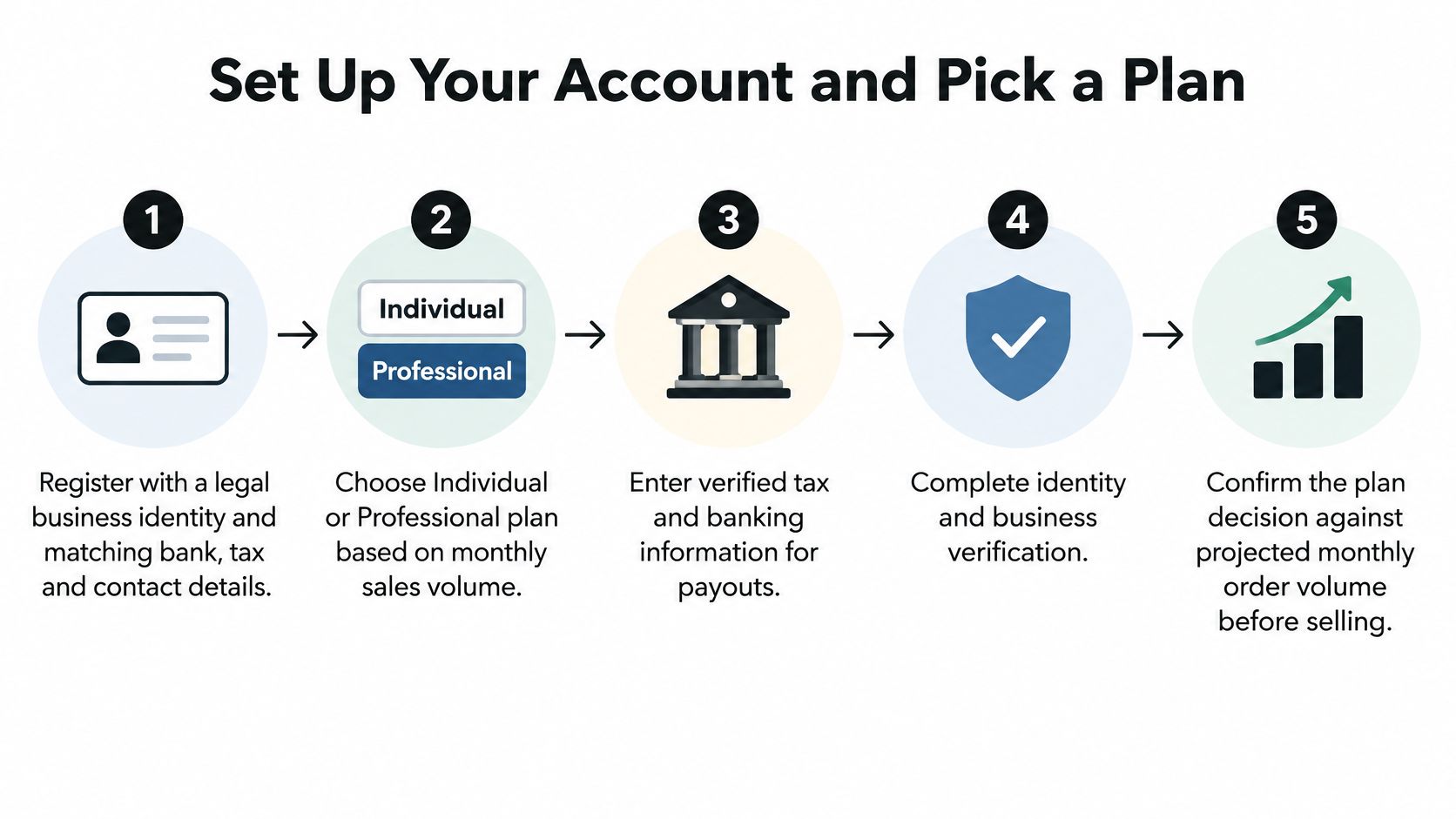
The five stages run in this order.
The setup sequence
- Register with details that match your documents. Legal business name, bank account, tax identification, address and phone should mirror the paperwork exactly. A trading name that differs from the registered name, or a bank account held by a different entity, sends the file back for review.
- Choose the marketplace, then the first category. Confirm the category you plan to start in is open to new sellers before you commit to inventory. Some categories require approval, and a few are closed to third-party sellers entirely.
- Compare plans before enrolling. The published Amazon selling plan pricing puts the Individual plan at $0.99 per item sold, positioned for sellers expecting fewer than 40 units per month, and the Professional plan at $39.99 per month regardless of how many products sell, positioned for sellers expecting more than 40 units per month. Amazon lists referral fees as a separate basic cost, so the plan charge isn’t your whole fee burden.
| Plan | Charge | Best fit | Cost note |
|---|---|---|---|
| Individual | $0.99 per item sold | Fewer than 40 units per month | Referral fees apply on top |
| Professional | $39.99 per month | More than 40 units per month | Flat charge regardless of volume |
| Referral fees | Set by category, charged per sale | Applies under either plan | Compare total cost, not the plan fee alone |
- Confirm the account is live. Open Account Health and Action Center and check that no setup or verification task is pending. Then walk each menu once and write down which task it serves, because that mapping carries the rest of the curriculum. On the document side, the Seller Central verification walkthrough covers what review tends to ask for.
- File every submitted document with its date. If you’re forming an entity for a European store, set up a limited company in Ireland through Chern & Co so the company name, registered address and director details you create are the ones you later hand to Amazon.
The common slip is treating a dashboard that loads as proof of full verification. Some tasks stay pending until documents clear review, and a seller ordering inventory against a half-verified account is exposed the moment review comes back with a question.
Build Listings That Pass Compliance Checks
A listing is a public claim about a product that Amazon can audit months after you publish it. Offered products must comply with the seller agreement, Amazon policies, and applicable laws and regulations, per Amazon’s product policies reference. That’s why the audit happens before publishing, not after the flag.

The listing procedure
- Pin the ASIN and the marketplace. One live offer, one set of rules. Editing a title against the wrong marketplace’s policy is a common way to create a violation while trying to fix one.
- Compare the offer against the rules that apply to it. Title, bullet points, images, packaging, condition description and any health or performance claim each get checked against the category policy. If the product sits in a gated category, check which products Amazon restricts before you buy stock. Amazon’s UK Seller University lists product rules and restrictions alongside listing creation for exactly this reason.
- Assemble the evidence pack. Invoices, brand authorization letters, test reports and supplier emails belong next to the listing, not buried in a personal inbox. The question that matters later isn’t whether you had permission. It’s whether you can produce the record on the day someone asks.
- Publish only after flags and attributes are resolved. Dismissing a restricted-product flag isn’t clearing it. Missing attributes get a value, unresolved flags get documentation, and anything you can’t document gets pulled from the catalog.
- Watch Account Health for a week after publication. New violations surface there first, and a fast correction is a far smaller problem than a settled pattern.
FBA does not remove the exposure
Sellers assume Fulfillment by Amazon transfers the compliance risk along with the packing. It doesn’t. The policy framework still applies to the product and to the offer, while the fulfillment metrics shift by method. A restricted product shipped by Amazon is still a restricted product.
The mistake that shows up most often is a reactive edit. A seller changes a title or deletes an image to make a flag disappear and never records why. Six weeks later the listing history shows a change with no explanation, and the reinstatement request has nothing behind it.
Keep a short change log beside every listing. Date, reason, reviewer and the evidence used. It costs almost nothing and it’s the first thing any audit, internal or external, will ask for.
Read Account Health Before It Reads You
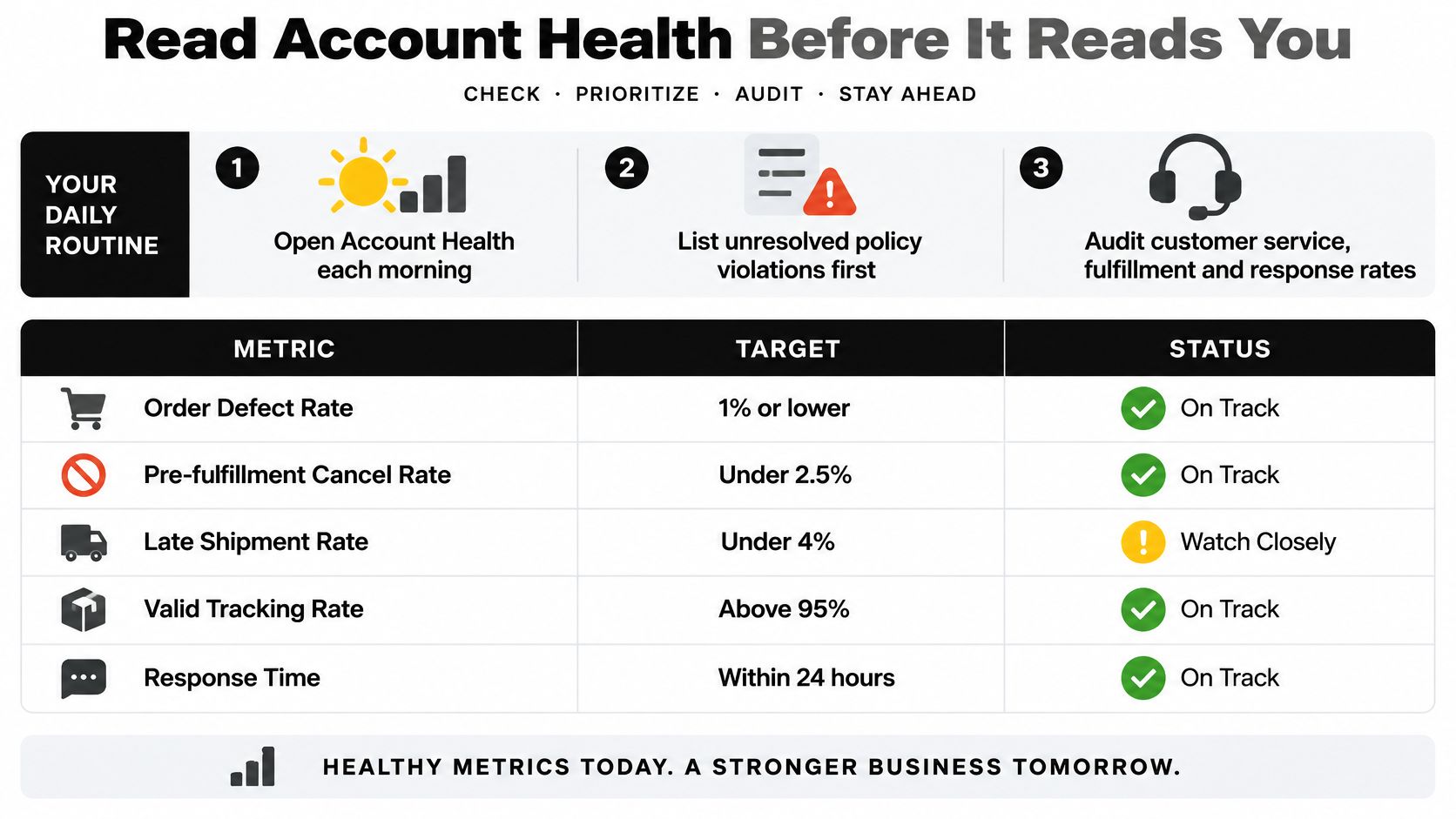
Open Account Health before you open sales. Start with unresolved policy violations, then work the panels for customer service, fulfillment, delivery and product policy, which is the daily routine Amazon’s Account Health reference is built around. For seller-fulfilled orders the four controls are Order Defect Rate, pre-fulfillment cancellation rate, late dispatch rate and Valid Tracking Rate, and each runs on its own clock.
The routine and the targets it should produce sit on one screen.
The arithmetic that catches new sellers
One defect in 50 orders is a 2% Order Defect Rate, double the line you’re expected to hold, and that single calculation explains why new accounts collect warnings that established ones never see. ODR is defective orders divided by total orders across a 60-day window. A seller shipping 50 orders a month can be pushed over by one bad batch.
The windows are what make the panel confusing. Amazon calculates cancellation rate over 7 days, late-dispatch performance over 10 or 30 days, and Valid Tracking Rate over 30 days. Two of the thresholds are published separately: a late shipment rate below 4% and a cancellation rate below 2.5%. Those targets, and the consequences of breaching them, including deactivation, withheld funds and loss of Featured Offer eligibility, are set out in this Amazon seller forums thread on account health.
| Metric | Rolling window | Benchmark | First thing to check |
|---|---|---|---|
| Order Defect Rate (ODR) | 60 days | Below 1% | Defective orders divided by total orders |
| Pre-fulfillment cancellation rate | 7 days | Below 2.5% | Stock accuracy and listing availability |
| Late dispatch rate | 10 or 30 days | Below 4% (late shipment rate) | Handling time and carrier pickup timing |
| Valid Tracking Rate | 30 days | Every dispatched order carries tracking, no exceptions | Tracking uploaded before the dispatch deadline |
Segment before you fix
Export the numbers and split the defects by SKU, carrier, warehouse and root cause before changing a single process. A defect rate driven by one carrier in one region needs a different repair than the same rate spread evenly across every order. When a warning puts your standing at risk, the Amazon account health rating guide explains how each notice feeds into it. Fix the largest bucket, then document the evidence that the process changed.
The walkthrough below shows the same panels in the interface, which helps when you’re training someone who has never opened them.
Four habits keep the metric red: watching revenue only, treating a customer review as if it were an ODR defect, ignoring the shorter cancellation window because the 60-day figure looks healthy, and marking a warning resolved before the number has recovered across the next rolling period.
Fix Fulfillment, Inventory and Ad Problems
Late dispatch and cancellation warnings surface before anything else in the metrics, which makes them the cheapest problems to catch and the most expensive to ignore. Each one has a symptom you can see in a day and a repair that takes a full window to prove.
Choose the method once, then justify it per SKU
Use FBA when fast delivery and returns handling matter more than control over packing and inserts. Use FBM when you need to own dispatch timing, when the packaging is part of the product, or when the item is bulky, fragile, expiry-dated or serialized. Deciding this per category instead of per SKU is how sellers end up with a heavy, slow-moving item sitting in a fulfillment center accruing storage cost while a small, fast item is packed by hand every morning.
Inventory sync sits behind most cancellation warnings
A listing that promises stock the warehouse doesn’t have turns browsers into cancellations. Reconcile counts weekly, sync the feed, and set reorder points from supplier lead time plus a buffer, not from gut feel. This is a one-day fix when you catch it early and a lost quarter when you find it through a metric.
Advertising explains itself in a weekly review
Run one campaign per goal, such as defending brand terms, harvesting category terms, or clearing aged stock, so the report tells you which goal failed. Review spend against sales weekly and pause search terms that spend without converting. Some fixes land overnight, like a corrected stock feed. Others, like recovering a defect rate, need the whole rolling window to close before you’ll see them in the panel.
| Symptom | Likely cause | Fix |
|---|---|---|
| Late dispatch warnings | Handling time set too long or a missed carrier pickup | Shorten handling time, confirm the pickup schedule and check the next rolling period |
| Cancellation rate climbing | Stock on the listing no longer matches the warehouse | Reconcile counts, sync the feed and set reorder points with lead time |
| Valid Tracking Rate falling | Tracking not uploaded before the dispatch deadline | Upload tracking at dispatch and confirm the rate recovers before scaling volume |
| Listing flagged for missing documents | Required attributes or authorization records not on file | Add documents, correct attributes and republish only after review |
| Ad spend rising with no sales | Broad search terms that never convert | Pause the terms, split campaigns by goal and review weekly |
A half-hour weekly review with one spreadsheet and one named owner catches most of this before it reaches a metric. The meeting stays short because the file is already open, and someone owns each line because “the team” fixes nothing.
Respond to a Suspension and Plan Your Next Step
A suspension notice is a deadline with a paragraph attached. The sellers who recover fastest aren’t writing the longest appeal. They’re producing a paper trail that already existed before the notice arrived. Most Amazon Seller Central training stops short at that point, teaching how to submit an appeal but not how to build the record that decides it.
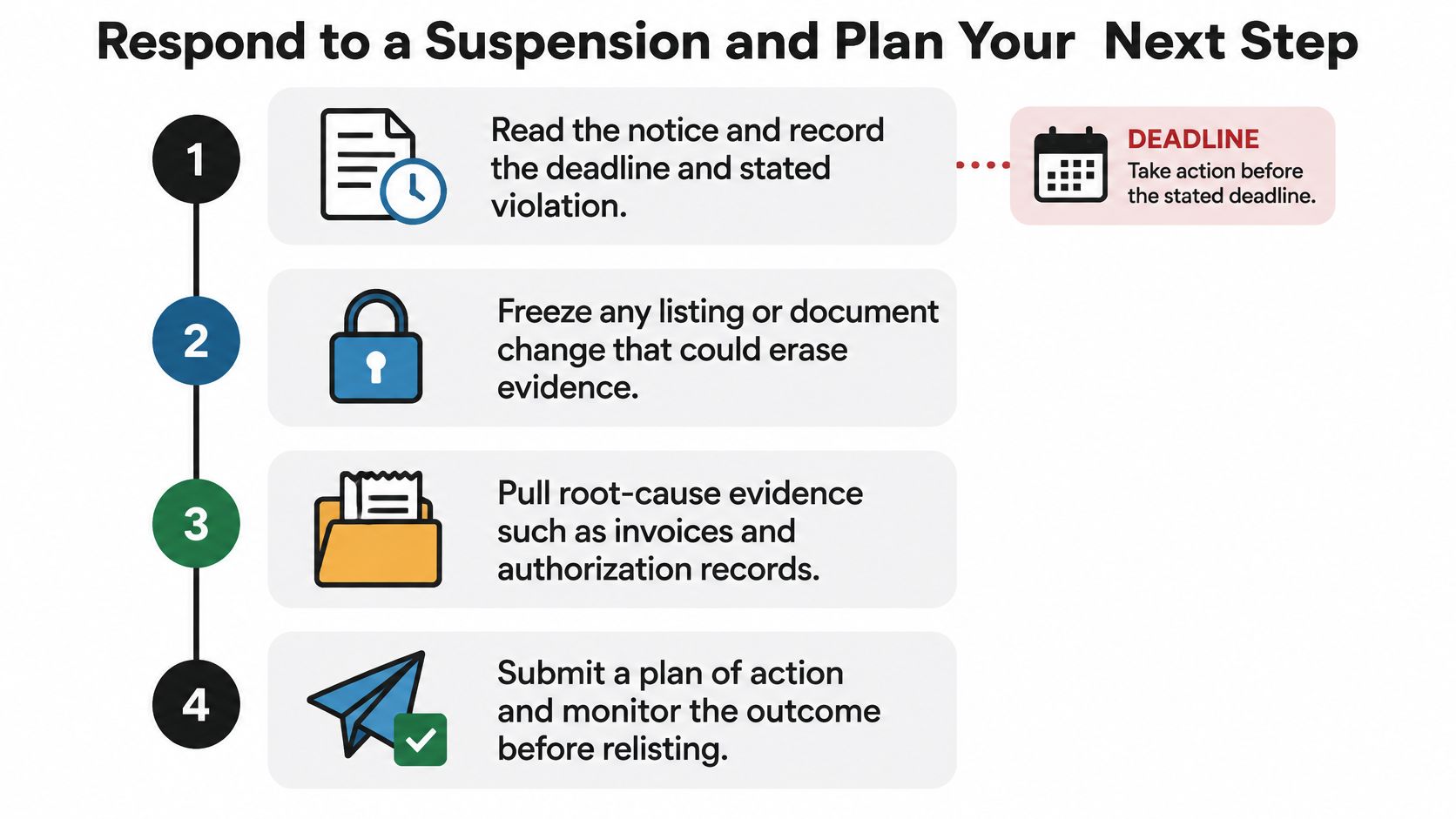
The response sequence
- Read the notice and record two things. The stated violation and the deadline. Everything else waits until both are written down.
- Freeze the account. No listing edits, no deleted documents, no rushed supplier emails. Evidence that disappears during a panic can’t be used three weeks later.
- Pull root-cause evidence. Invoices, authorization records, supplier communications, shipment and tracking proof, each with the date it was created. For an intellectual-property complaint, the authorization record is usually the document that decides the outcome.
- Draft a corrective response that states three things. The root cause, the immediate correction, and the preventive control that stops a repeat. Don’t open with the argument that the violation was accidental. The reviewer is assessing process, not remorse.
- Submit once and log it. Date, channel, what was included, and the reply. Follow-up submissions that contradict the first one cost more than they repair.
- Set the escalation boundary in advance. If the appeal is rejected or the dashboard stays suspended, move to professional review with the full file rather than rewriting the same appeal.
Three questions every response should answer before it goes out. What is the root cause, in one sentence? What changed the day you found it? What stops it recurring in ninety days? If any answer needs a page of context, the file isn’t ready.
Amazon publishes no universal reinstatement success rate, so plan the downside while you wait. Cash-flow and inventory contingencies belong in the same folder: which SKUs can move through another channel, what ad spend pauses this week, and how many weeks of runway exist if funds stay held.
A 30-day action list
- Week one: modules one to three, ending with a live mapping of every Seller Central menu to the task it serves.
- Week two: the 25-SKU listing audit, with a recorded pass or fix and a named owner on each line.
- Week three: a weekly Account Health review, scheduled, with one owner and a written record of every decision.
- Week four: the rebuild test. Hand the operating file to someone with no context and ask them to reconstruct one listing’s history from it. If they can’t, the file isn’t finished.
If a suspension or withheld funds already exist, bring the notice, the evidence file and the timeline to a qualified attorney before the deadline. Our eCommerce practice at LA Law Group, APLC covers Amazon account reinstatements and appeals, chargebacks and disputes, brand protection, and intellectual-property violations for online sellers, and we work with sellers both before and after a complaint lands.
This article is for informational purposes only and is not legal advice. No attorney-client relationship exists based on reviewing it, and none of the information in it is legal advice.
A suspension gets more expensive every day it runs: inventory sits, storage fees accrue, and advertising spend goes nowhere. LA Law Group, APLC works with Amazon sellers on account reinstatements and appeals, chargebacks and disputes, brand protection, and intellectual-property complaints, and can review your notice and evidence file before you submit anything. Visit LA Law Group, APLC to schedule a free initial consultation and get a second set of eyes on the file that decides your account.
Attorney Advertising. This article is general information, not legal advice, and does not create an attorney-client relationship. Prior results do not guarantee a similar outcome.